
Building a Modern Data Lake Architecture on AWS
The modern data landscape is characterized by an explosion of data from diverse sources, in various formats, and at increasing velocities. Organizations need a robust and scalable way to store, process, analyze, and derive insights from this vast amount of information. This is where the concept of a data lake comes in, and Amazon Web Services (AWS) provides a powerful suite of services to build a state-of-the-art data lake architecture.
Imagine a traditional data warehouse as a meticulously organized library, where books (data) are carefully cataloged, indexed, and stored in specific sections. This works well for structured data with predefined schemas. However, a data lake is more like a vast, natural lake. Different streams and rivers (data sources) flow into it, carrying various forms of water (structured, semi-structured, and unstructured data) and sediment. The beauty of the lake is its ability to hold everything in its raw, natural state, allowing for diverse analysis and exploration later.
Why build a data lake on AWS?
AWS offers a comprehensive set of managed services that simplify the process of building and managing a data lake, providing:
- Scalability and Durability: Services like Amazon S3 offer virtually unlimited storage with industry-leading durability and availability.
- Cost-Effectiveness: Pay-as-you-go pricing and tiered storage options help optimize costs.
- Security and Compliance: Robust security features and compliance certifications ensure data protection.
- Integrated Analytics Services: A wide range of analytics services like Amazon Athena, Amazon EMR, Amazon Redshift, and Amazon SageMaker seamlessly integrate with the data lake.
- Data Governance and Management: Tools like AWS Glue and AWS Lake Formation help catalog, cleanse, and secure data.
Key Components of a Modern Data Lake Architecture on AWS:
A typical modern data lake architecture on AWS consists of the following layers:
- Ingestion Layer: This layer focuses on bringing data into the data lake from various sources.
- Storage Layer: This is where the raw data resides in its native format.
- Processing Layer: This layer involves transforming, enriching, and preparing data for analysis.
- Governance and Security Layer: This ensures data quality, security, and compliance.
- Consumption Layer: This layer provides tools and services for users to access and analyze the data.
Let’s delve deeper into each layer:
1. Ingestion Layer:
This crucial layer acts as the entry point for data. Common AWS services used for ingestion include:
- AWS S3: For batch data ingestion from various sources like applications, databases, and sensors. You can simply upload files directly to S3 buckets.
- AWS Kinesis Data Streams: For real-time streaming data ingestion from sources like IoT devices, website clickstreams, and social media feeds. Kinesis Data Streams allows you to collect and process high-velocity data in real time.
- AWS Kinesis Data Firehose: For reliably loading streaming data into data lakes, data stores, and analytics services. Firehose can automatically scale to handle varying data throughput and can also perform basic transformations.
- AWS DataSync: For efficiently and securely transferring large amounts of data between on-premises storage systems and AWS storage services like S3.
- AWS Snow Family (Snowball, Snowcone, Snowmobile): For securely transferring exabyte-scale datasets to AWS when network bandwidth is limited.
Analogy: Think of the ingestion layer as the various rivers and streams feeding into our data lake. Each river (service) is designed to handle a specific type and flow of water (data).
Practical Example:
Imagine a retail company wants to ingest both daily sales transaction data from their POS systems (batch) and real-time clickstream data from their website. They could use S3 for the daily batch uploads and Kinesis Data Streams for the continuous website clickstream data. Kinesis Data Firehose could then be used to deliver the processed clickstream data to S3.
2. Storage Layer:
The heart of the data lake is the storage layer, primarily powered by Amazon Simple Storage Service (S3). S3 provides:
- Object Storage: Data is stored as objects within buckets, with virtually unlimited scalability.
- Schema-on-Read: Data is stored in its native format without requiring upfront schema definition, providing flexibility for diverse data types.
- Durability and Availability: S3 offers 99.999999999% (eleven 9s) of data durability and high availability.
- Cost-Effective Storage Tiers: S3 offers different storage classes (e.g., S3 Standard, S3 Intelligent-Tiering, S3 Standard-IA, S3 Glacier) to optimize costs based on data access frequency.
Analogy: S3 is our vast, natural lake that can hold all types of water and sediment in their original form.
Practical Example:
All the raw sales transaction data, website clickstream data, customer reviews, and product images would be stored in different S3 buckets or prefixes within a bucket.
Architecture Diagram:

3. Processing Layer:
This layer is where the magic happens – transforming and preparing the raw data for analysis. Key AWS services in this layer include:
- AWS Glue: A fully managed ETL (Extract, Transform, Load) service. Glue provides a central metadata repository (AWS Glue Data Catalog), automatically discovers data schemas, and generates ETL code (in Python or Scala).
- Practical Example: Using Glue to cleanse customer data (e.g., standardize address formats), transform sales transaction data into a more analytical format, and load it into another S3 location or a data warehouse.
- Amazon EMR (Elastic MapReduce): A managed Hadoop framework that allows you to run big data processing frameworks like Apache Spark, Hive, and Presto. EMR is ideal for complex data transformations, machine learning, and interactive analytics on large datasets.
- Practical Example: Using EMR with Spark to process massive amounts of web server logs to identify user behavior patterns or to train machine learning models on historical sales data.
- AWS Lambda: A serverless compute service that allows you to run code without provisioning or managing servers. Lambda can be triggered by events in S3 or Kinesis to perform lightweight data transformations.
- Practical Example: Using Lambda to automatically convert new image files uploaded to S3 into thumbnails or to validate incoming data against a predefined schema.
- Amazon Athena: An interactive query service that makes it easy to analyze data directly in S3 using standard SQL. Athena is serverless, so you only pay for the queries you run.
- Practical Example: Using Athena to perform ad-hoc analysis on website clickstream data to understand user engagement with different product pages.
Analogy: The processing layer is like various workshops around the lake. Some workshops (Glue) have automated tools to clean and organize the sediment, while others (EMR) have powerful machinery for more complex transformations. Small, specialized tasks can even be handled by quick, on-demand workers (Lambda).
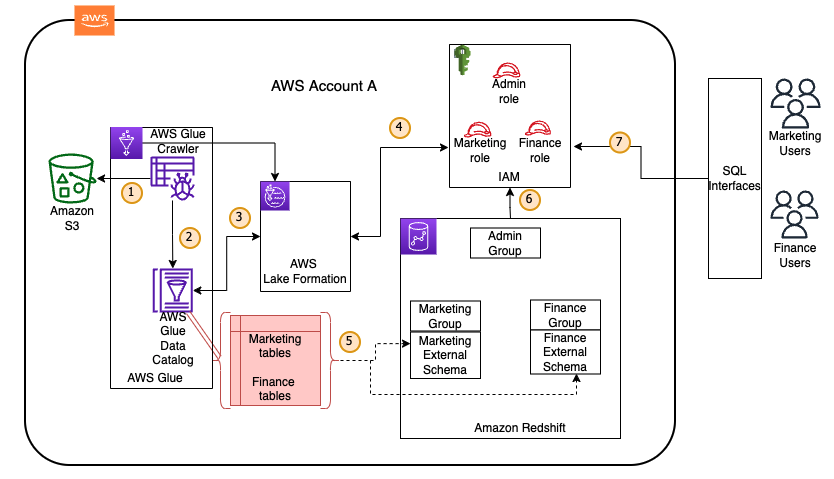
4. Governance and Security Layer:
Ensuring data quality, security, and compliance is paramount in a data lake. AWS offers services like:
- AWS Lake Formation: A service that makes it easy to set up, secure, and manage data lakes. Lake Formation builds on top of S3 and AWS Glue to provide fine-grained access control at the data and metadata level. It allows you to define centralized security policies that are consistently enforced across various analytics services.
- Practical Example: Using Lake Formation to grant specific users or groups access only to certain columns or rows of customer data.
- AWS Glue Data Catalog: A central metadata repository containing information about the data in your data lake, including schema, data types, and location. This allows different analytics services to understand and query the data consistently.
- AWS Identity and Access Management (IAM): Provides granular control over who has access to which AWS resources and what actions they can perform.
- Amazon Macie: A fully managed data security and data privacy service that uses machine learning and pattern matching to discover and protect your sensitive data in AWS.
- AWS KMS (Key Management Service): Allows you to create and manage encryption keys used to protect your data at rest in S3 and other AWS services.
Analogy: This layer represents the security guards, librarians (managing the catalog), and rulebooks that ensure the lake is safe, organized, and accessible only to authorized individuals.
Architecture Diagram:
 5. Consumption Layer:
This layer provides various tools and services for users to access and analyze the curated data in the data lake to derive business insights. Common services include:
- Amazon Athena: For interactive SQL querying of data in S3.
- Amazon Redshift: A fast, fully managed, petabyte-scale data warehouse service optimized for analytical workloads. Transformed and curated data can be loaded into Redshift for high-performance BI and reporting.
- Amazon EMR: For running advanced analytics, machine learning algorithms, and interactive queries using tools like Spark and Presto.
- Amazon SageMaker: A fully managed machine learning service that enables data scientists and developers to build, train, and deploy machine learning models. The data lake serves as a rich source of training data for SageMaker.
- Amazon QuickSight: A fast, cloud-powered business intelligence (BI) service that allows you to create interactive dashboards and visualizations from data in S3, Redshift, and other sources.
Analogy: This layer represents the various ways people can utilize the water from the lake – some might drink it directly (Athena for quick queries), others might process it further for specific uses (Redshift for structured reporting), while some might study its properties in detail (SageMaker for machine learning).
Step-by-Step Example: Building a Simple Batch Data Lake
Let’s outline the steps to build a basic batch data lake on AWS:
- Create an S3 Bucket: Create an S3 bucket to serve as the central storage for your raw data. Choose a descriptive name for your bucket.
- Ingest Data into S3: Upload your batch data files (e.g., CSV, JSON, Parquet) into the designated S3 bucket. You can use the AWS Management Console, AWS CLI, or SDKs.
- Set up AWS Glue Crawler: Create an AWS Glue crawler that will connect to your S3 bucket, infer the schema of your data, and populate the AWS Glue Data Catalog.
- Specify the S3 path(s) where your data resides.
- Configure the crawler’s schedule (e.g., run on demand or periodically).
- Define an IAM role with appropriate permissions for the crawler to access S3 and the Glue Data Catalog.
- Review the AWS Glue Data Catalog: Once the crawler has run, review the tables created in the Glue Data Catalog. Verify that the schema has been correctly inferred.
- Query Data with Amazon Athena: Use the AWS Management Console or an SQL client to query the data in your S3 bucket using Amazon Athena. Select the database and table created by the Glue crawler and start running SQL queries.
Key Takeaways:
- A modern data lake on AWS provides a scalable, cost-effective, and secure platform for storing and analyzing diverse data.
- Services like S3, Glue, Kinesis, EMR, Athena, Lake Formation, and SageMaker are key building blocks of this architecture.
- The architecture is typically divided into ingestion, storage, processing, governance and security, and consumption layers.
- AWS provides a comprehensive suite of managed services that simplify the complexities of building and managing a data lake.
- Understanding the purpose and capabilities of each AWS service is crucial for designing an effective data lake architecture tailored to your specific needs.
By leveraging the power and flexibility of AWS, organizations can build robust and future-proof data lakes that unlock the true potential of their data, driving innovation and informed decision-making.