
Real-Time Data Streaming with Kinesis and MSK: An End-to-End Guide
Real-time data streaming has become a cornerstone of modern data architectures, enabling businesses to react instantly to events, gain immediate insights, and build responsive applications. AWS offers two powerful services in this space: Amazon Kinesis and Amazon Managed Streaming for Apache Kafka (MSK). While both facilitate real-time data ingestion and processing, they cater to different needs and offer distinct capabilities. This guide provides an end-to-end overview of how to leverage these services effectively.
Imagine a busy highway (your data stream).
- Amazon Kinesis is like a highly managed, multi-lane highway operated entirely by AWS. You just send your data vehicles (data records) onto the highway, and AWS takes care of everything – the road maintenance, traffic management, and ensuring your vehicles reach their destinations. It’s scalable, resilient, and requires minimal operational overhead.
- Amazon MSK is like having the blueprints and tools to build and manage your own customized highway system based on Apache Kafka. You have more control over the design and configuration, which is beneficial if you have specific requirements or are already heavily invested in the Kafka ecosystem.
Let’s delve deeper into each service and how they can be used in an end-to-end streaming pipeline.
Amazon Kinesis: The Fully Managed Streaming Solution
Kinesis offers a suite of services designed for different stages of real-time data processing:
- Kinesis Data Streams: This is the core service for ingesting and storing massive streams of data. Data is organized into shards, which provide a unit of throughput capacity. Producers send data to the stream, and multiple consumers can process this data in parallel and in near real-time. Think of shards as individual lanes on our Kinesis highway, each capable of handling a certain volume of traffic.
- Use Case: Ingesting clickstream data from a website, sensor data from IoT devices, or application logs for real-time monitoring.
.
-
- Practical Example (Conceptual): An e-commerce website sends every user click, product view, and purchase event to a Kinesis Data Stream. Real-time analytics applications consume this stream to personalize recommendations, track marketing campaign effectiveness, and detect fraudulent activities.
- Kinesis Data Firehose: This service simplifies loading streaming data into AWS data stores like Amazon S3, Amazon Redshift, Amazon OpenSearch Service, and third-party destinations. It automatically scales and handles tasks like data transformation and format conversion. Think of Data Firehose as the efficient off-ramps from our Kinesis highway, directly delivering specific types of cargo to their designated warehouses.
- Use Case: Archiving raw clickstream data in S3 for later analysis, loading processed data into Redshift for business intelligence dashboards, or feeding logs into OpenSearch for real-time search and visualization.

-
- Practical Example (Conceptual): The same e-commerce website using Kinesis Data Streams can use Kinesis Data Firehose to automatically deliver the raw clickstream data to an S3 bucket in Parquet format for cost-effective long-term storage and batch processing with services like Amazon Athena.
- Kinesis Data Analytics: This service allows you to process and analyze streaming data in real time using SQL or Apache Flink. You can build sophisticated analytics applications without managing any infrastructure. Imagine Data Analytics as real-time processing centers built right beside our Kinesis highway, analyzing the data as it flows by.
- Use Case: Building real-time dashboards, generating alerts based on streaming data patterns, or performing complex event processing.

-
- Practical Example (Conceptual): Using Kinesis Data Analytics with SQL, the e-commerce platform can continuously calculate the top 10 most viewed products in the last minute and display them on a real-time dashboard, enabling marketing teams to quickly react to trending items.
Amazon MSK: Managed Apache Kafka Service
Amazon MSK provides a fully managed service that makes it easy to build and run applications using Apache Kafka, an open-source distributed streaming platform. MSK handles the operational complexities of setting up, scaling, and managing Kafka clusters, allowing you to focus on your applications. With MSK, you have the flexibility and extensive ecosystem of Kafka while offloading the infrastructure management. This is like having AWS manage the underlying infrastructure of your custom-built highway system.
- Key Concepts: Kafka organizes data into topics, which are further divided into partitions. Producers write data to topics, and consumers subscribe to topics to read data. Brokers are the servers that make up the Kafka cluster, and ZooKeeper is used for cluster coordination.
- Use Case: Organizations already using Kafka on-premises or those needing fine-grained control over their streaming infrastructure often choose MSK. It’s suitable for building highly scalable and fault-tolerant event-driven microservices, real-time data pipelines, and messaging systems.
-
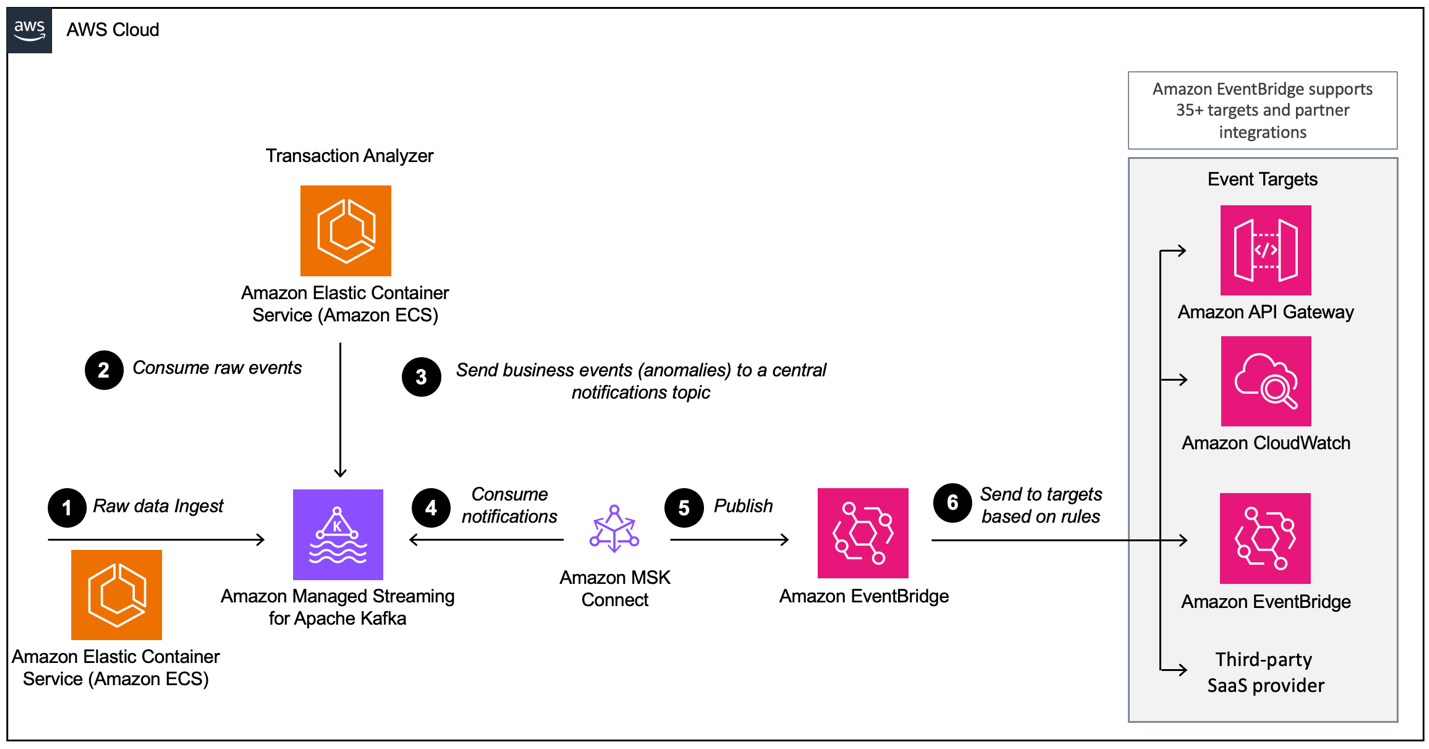
- Practical Example (Conceptual): A financial services company might use MSK as the central nervous system for its microservices architecture. Different services, such as trading platforms, risk management systems, and notification services, can communicate asynchronously and reliably by producing and consuming events from Kafka topics managed by MSK.
Building an End-to-End Real-Time Data Streaming Pipeline
Let’s outline a general step-by-step process for building a real-time data streaming pipeline using either Kinesis or MSK:
Using Amazon Kinesis:
- Create a Kinesis Data Stream: Define the number of shards based on your expected throughput.
- Implement Data Producers: Develop applications or configure services to send data records to the Kinesis Data Stream using the AWS SDK.
- Choose Data Processing Mechanism:
- For simple delivery to data stores, create a Kinesis Data Firehose delivery stream, specifying the source stream and the destination (e.g., S3, Redshift).
- For real-time analytics and transformations, create a Kinesis Data Analytics application, defining your processing logic using SQL or Flink. Configure it to read from the Kinesis Data Stream and optionally write to another stream or a data store.
- For custom processing logic, develop Kinesis Data Stream Consumers using the Kinesis Client Library (KCL) or the enhanced fan-out feature with SDK integrations. These consumers can perform complex transformations, aggregations, or enrichments and then persist the processed data to various destinations.
- Monitor and Scale: Utilize Amazon CloudWatch to monitor the performance of your Kinesis streams, Firehose delivery streams, and Analytics applications. Adjust the number of shards in your Kinesis Data Stream as needed to handle changing data volumes.
Using Amazon MSK:
- Create an MSK Cluster: Configure the number of brokers, instance types, and storage per broker. Set up network access and security groups.
- Create Kafka Topics: Define the topics that will carry your data streams, specifying the number of partitions and replication factor.
- Implement Kafka Producers: Develop applications to produce data to the designated Kafka topics within your MSK cluster using standard Kafka client libraries.
- Implement Kafka Consumers: Develop applications to consume data from the Kafka topics using Kafka client libraries. These consumers will perform the necessary data processing and persist the results to downstream systems. You might leverage stream processing frameworks like Kafka Streams or Apache Flink for more complex transformations.
- Integrate with AWS Services (Optional): You can integrate your MSK cluster with other AWS services like AWS Lambda (using Kafka triggers) or connect it to data stores like S3 or databases.
- Monitor and Scale: Monitor your MSK cluster using Amazon CloudWatch metrics and MSK-specific monitoring features. Scale your cluster by adding or resizing brokers as your data volume and processing needs evolve.
Key Takeaways
- Kinesis is a fully managed, scalable, and cost-effective solution for real-time data streaming, ideal for use cases where operational simplicity is paramount. It offers integrated services for ingestion, delivery, and analytics.
- MSK provides a managed Apache Kafka service, offering more control and compatibility with the Kafka ecosystem. It’s a good choice for organizations with existing Kafka investments or those requiring the flexibility and advanced features of Kafka.
- Choosing between Kinesis and MSK depends on your specific requirements, including the level of control needed, existing infrastructure, team expertise, and cost considerations.
- Both services enable you to build powerful real-time data streaming pipelines that can unlock valuable insights and drive immediate actions based on your data.
By understanding the core concepts and capabilities of Amazon Kinesis and MSK, you can effectively design and implement robust real-time data streaming solutions tailored to your specific business needs.