Okay, I will write a blog post on building scalable multi-account governance frameworks in AWS for advanced users, ensuring it is clear, easy to understand, includes analogies, practical examples, step-by-step instructions where applicable, relevant diagram links, and a summary of key takeaways. I will also generate a realistic image representing this topic.
Prompt for Image Generation: A wide, interconnected network of glowing blue nodes representing AWS accounts, with a central, larger, and brighter node symbolizing a governance framework overseeing the others. The connections between nodes are strong and clear, indicating established control and communication. The background is a dark, starry sky, suggesting scalability and the vastness of the cloud.
Building Scalable Multi-Account Governance Frameworks in AWS
For organizations embracing the power of the AWS cloud at scale, a well-architected multi-account strategy is paramount. However, simply having multiple accounts isn’t enough. To truly leverage this approach effectively and securely, you need a robust and scalable governance framework. This post dives into the key considerations and practical steps for building such a framework in AWS.
Why Multi-Account Governance Matters
Think of your AWS environment as a large city. Each account is like a distinct neighborhood or business unit. Without a central governance framework, these individual entities might operate in silos, leading to:
- Inconsistent Security Posture: Different accounts may implement varying security controls, creating vulnerabilities.
- Cost Inefficiencies: Lack of centralized oversight can lead to redundant resources and unoptimized spending.
- Operational Overhead: Managing policies and compliance across numerous disparate accounts becomes cumbersome.
- Difficulty in Auditing and Compliance: Gaining a holistic view of your AWS environment for audit purposes becomes a significant challenge.
A strong governance framework acts as the city’s central planning authority, ensuring consistency, security, and efficiency across all its “neighborhoods.”
Key Components of a Scalable Governance Framework
Building an effective framework involves several crucial components:
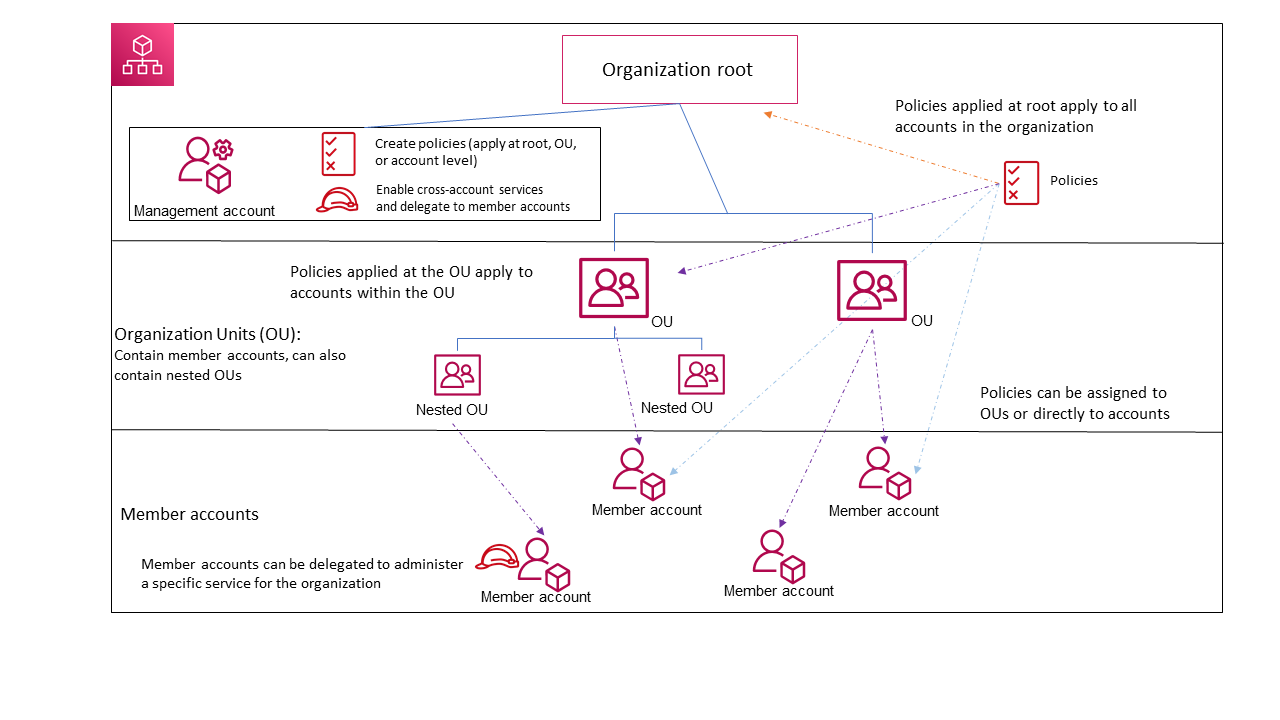
- Organizational Structure with AWS Organizations: This is the foundation of your multi-account strategy. AWS Organizations allows you to centrally manage and govern your accounts, organized into a hierarchical structure (Organization Units or OUs).
- Analogy: Think of AWS Organizations as the blueprint for your city, defining the boundaries and relationships between different districts (OUs) and individual buildings (accounts).
- Practical Example: You might create OUs for “Production,” “Development,” and “Sandbox” environments, applying specific policies at each OU level.
- Centralized Identity and Access Management (IAM): Managing users and permissions across multiple accounts individually is inefficient and error-prone. AWS IAM Identity Center (successor to AWS SSO) provides a central place to manage identities and federated access to your AWS accounts.
- Analogy: IAM Identity Center is like a central ID card issuing office for your city. Once a resident (user) has an ID, it can be used to access different buildings (accounts) based on the permissions granted centrally.
- Practical Example: You can create user groups in IAM Identity Center (e.g., “Developers,” “Security Admins”) and assign them predefined permission sets that automatically apply across selected accounts.
- Centralized Logging and Monitoring: Gaining visibility into activity and potential issues across your multi-account environment is critical. AWS services like AWS CloudTrail, AWS Config, and Amazon CloudWatch Logs can be aggregated into a central logging account.
- Analogy: Centralized logging is like having a city-wide surveillance system. All important events and activities in different neighborhoods are recorded and can be reviewed from a central monitoring station.
- Practical Example: Configure all your accounts to send CloudTrail logs to a dedicated “Security Audit” account and use Amazon CloudWatch dashboards to monitor key metrics across all environments.
- Automated Policy Enforcement with Service Control Policies (SCPs): SCPs, a feature of AWS Organizations, allow you to centrally define and manage guardrails for all accounts within your organization. They define the maximum permissions that account administrators can delegate to their IAM users and roles.
- Analogy: SCPs are like city-wide regulations enforced at a high level. For example, a regulation might state that no building can exceed a certain height (preventing the creation of overly permissive IAM roles).
- Practical Example: You can use SCPs to prevent the creation of public S3 buckets in your production accounts or to mandate the use of specific encryption standards.
- Cost Management and Optimization: Centralized visibility into spending across all accounts is essential for cost optimization. AWS Cost Explorer and AWS Budgets, managed centrally through the management account, provide this capability.
- Analogy: Centralized cost management is like the city’s finance department, tracking all expenditures across different departments (accounts) and identifying areas for savings.
- Practical Example: Set up AWS Budgets to alert you when the total spending across your organization exceeds a certain threshold.
- Security Hub and GuardDuty for Centralized Security Posture Management: These services allow you to aggregate and prioritize security findings from various AWS services across your accounts, providing a unified view of your security posture.
- Analogy: Security Hub and GuardDuty are like the city’s central security command center, receiving alerts from various security systems across all neighborhoods and providing a consolidated view of potential threats.
- Practical Example: Configure Security Hub to automatically aggregate findings from GuardDuty, Inspector, and IAM Access Analyzer across all your member accounts.
- Infrastructure as Code (IaC) and Automation: Employing IaC tools like AWS CloudFormation or HashiCorp Terraform to provision and manage resources consistently across accounts is crucial for scalability and governance. Automate routine tasks like security patching and compliance checks.
- Analogy: IaC is like using standardized blueprints and automated construction processes for building in your city, ensuring consistency and reducing manual errors across all developments.
- Practical Example: Use CloudFormation templates to deploy baseline security configurations (e.g., VPC settings, security groups) consistently across new accounts.
Step-by-Step: Implementing Basic Multi-Account Governance
Here’s a simplified initial approach:
- Create an AWS Organization: Design your organizational structure with OUs based on your business needs (e.g., environment, department).
- Enable Consolidated Billing: Link your existing accounts to your organization’s management account to benefit from volume discounts and simplified billing.
- Implement Basic SCPs: Start with restrictive SCPs to establish fundamental guardrails, such as preventing root user access or restricting regions.
- Set up Centralized Logging: Configure CloudTrail and Config to deliver logs to a dedicated security account.
- Onboard Accounts to IAM Identity Center: Configure IAM Identity Center and define initial permission sets for common roles.
- Enable AWS Security Hub: Aggregate security findings from across your organization in the management or a dedicated security account.
Key Takeaways
- A well-defined multi-account governance framework is essential for managing AWS environments at scale.
- AWS Organizations forms the bedrock of your multi-account strategy.
- Centralized IAM, logging, policy enforcement, and security monitoring are crucial components.
- Automation and Infrastructure as Code are key enablers for scalability and consistency.
- Start with a foundational set of governance controls and iterate based on your organization’s evolving needs.
By implementing a robust and scalable multi-account governance framework, you can confidently expand your AWS footprint while maintaining security, compliance, and cost efficiency.