
Level Up Your Pipelines: Advanced CI/CD for Cloud-Native
Cloud-native applications, with their microservices, containers, and dynamic infrastructure, demand more sophisticated CI/CD pipelines than traditional monolithic deployments. Moving beyond basic build-test-deploy, advanced strategies focus on speed, resilience, and developer autonomy. Let’s dive into some key techniques to supercharge your delivery process.
1. Blue/Green Deployments: Zero-Downtime Updates
Imagine you’re upgrading the engine of a running car. Sounds impossible, right? Blue/Green deployment aims to achieve exactly that for your applications.
Concept: You maintain two identical production environments: “Blue” (the current version) and “Green” (the new version). Traffic is routed to Blue while Green is updated and tested. Once Green is stable, traffic is seamlessly switched over. If issues arise, you can instantly roll back to Blue.
Analogy: Think of two identical stages for a concert. While the current band plays on the “Blue” stage, the crew sets up the “Green” stage with the new equipment. Once ready and tested, the audience is smoothly directed to the “Green” stage. If anything goes wrong, they can quickly revert to the “Blue” stage.
Practical Example: Deploying a new version of a microservice on Amazon ECS or EKS.
Steps:
- Provision the Green environment: Deploy the new version of your application alongside the existing Blue environment.
- Test the Green environment: Run thorough integration and user acceptance tests against the Green environment without impacting live users.
- Switch traffic: Update your load balancer (e.g., AWS Application Load Balancer) to direct traffic from Blue to Green.
- Monitor: Observe the Green environment for any errors or performance issues.
- Terminate (optional): If everything is stable, decommission the Blue environment.
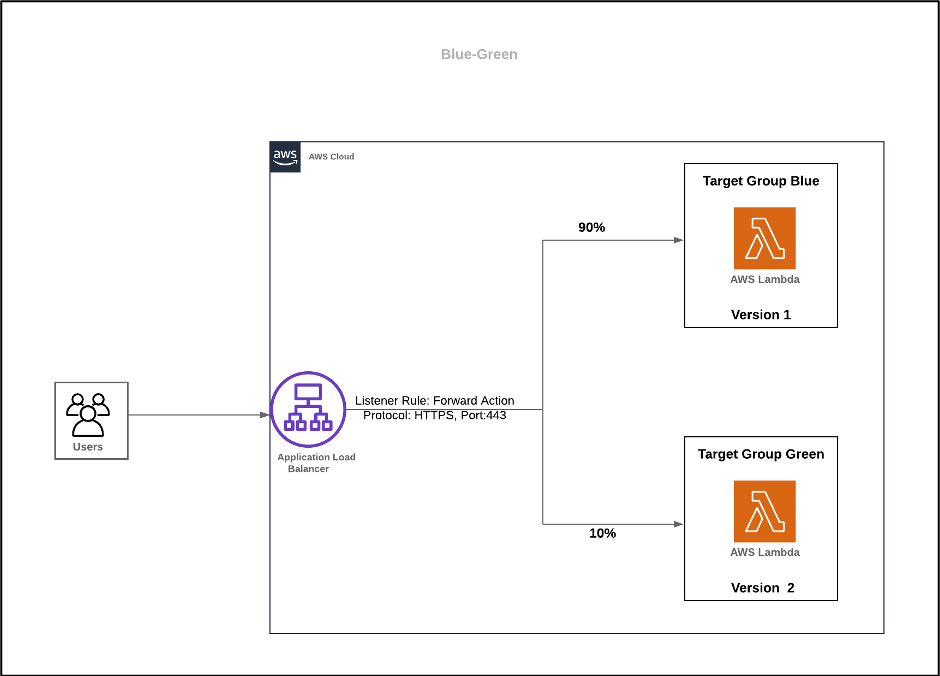
2. Canary Deployments: Gradual Rollouts and Risk Mitigation
Blue/Green is like flipping a switch. Canary deployments are more about gradually introducing the new version to a small subset of users before a full rollout.
Concept: Deploy the new version (the “canary”) to a small percentage of your users while the majority remain on the old version. Monitor the canary for any issues. If all is well, gradually increase the percentage of users exposed to the new version until it completely replaces the old one.
Analogy: Imagine testing a new batch of cookies by giving a few to your trusted friends first. If they love them, you give out more. If there’s a problem, you can stop the rollout before everyone gets a bad cookie.
Practical Example: Releasing a new feature in a web application using feature flags and gradually enabling it for more user groups.
Steps:
- Deploy the canary: Release the new version to a small subset of your infrastructure.
- Route a small percentage of traffic: Configure your load balancer or service mesh to direct a small portion of user requests to the canary instances.
- Monitor the canary: Closely observe the performance, error rates, and user feedback for the canary instances.
- Analyze and decide: If the canary is stable, gradually increase the traffic percentage. If issues arise, roll back the canary.
- Full rollout or rollback: Continue increasing traffic until the new version handles all requests or rollback to the previous version.

3. Feature Flags (or Toggles): Decoupling Deployment from Release
Feature flags are a powerful technique to separate the act of deploying code from the act of releasing a new feature to users.
Concept: Wrap new or experimental features in conditional logic controlled by configuration. You can deploy the code with the feature flag turned “off,” and then enable it for specific users or groups without redeploying.
Analogy: Think of a light switch. The wiring (code deployment) is done, but the light (feature release) is only turned on when you flip the switch.
Practical Example: Introducing a new user interface element. You can deploy the code changes, but keep the new UI hidden behind a feature flag. You can then enable it for beta users or perform A/B testing before rolling it out to everyone.
Steps:
- Implement feature flags in your code: Use a feature flag library or implement your own logic to check the state of a flag.
- Deploy code with flags: Deploy the new code with the feature flags set to “off” by default.
- Configure flags: Use a configuration management system or a dedicated feature flag service (e.g., AWS AppConfig, LaunchDarkly) to manage flag states.
- Enable/disable features: Toggle the flags for specific user segments or the entire user base without requiring a new deployment.
4. Automated Rollbacks: Ensuring Stability
Even with thorough testing, issues can sometimes slip into production. Automated rollbacks are crucial for quickly recovering from failed deployments.
Concept: Define clear criteria for a “failed” deployment (e.g., increased error rates, failed health checks). If these criteria are met after a deployment, the system automatically reverts to the last known stable version.
Analogy: Imagine a self-driving car with a “panic button” that automatically returns to a safe, previously known good state if it detects a critical error.
Practical Example: Using monitoring tools like Amazon CloudWatch Alarms to trigger an automatic rollback in your deployment pipeline if certain metrics exceed predefined thresholds after a deployment to AWS Elastic Beanstalk or AWS CodeDeploy.
Steps:
- Define rollback triggers: Identify key metrics (e.g., HTTP 5xx errors, CPU utilization) and set up alarms to monitor them after each deployment.
- Integrate with your CI/CD pipeline: Configure your pipeline (e.g., AWS CodePipeline) to listen for these alarms.
- Automate rollback actions: Define the steps to automatically revert to the previous deployment version when a rollback trigger is activated. This might involve redeploying the previous commit or switching back to a previous infrastructure configuration.
5. Infrastructure as Code (IaC) Integration: Consistent and Repeatable Environments
While not strictly a deployment strategy, integrating Infrastructure as Code (IaC) practices deeply into your CI/CD pipeline is fundamental for advanced cloud-native deployments.
Concept: Manage your infrastructure (servers, databases, load balancers, etc.) using code (e.g., AWS CloudFormation, Terraform). This allows you to version control your infrastructure, automate its provisioning, and ensure consistency across environments.
Analogy: Instead of manually building a house brick by brick each time, you have a blueprint (IaC template) that can be used to quickly and consistently build identical houses.
Practical Example: Using AWS CloudFormation templates to define your ECS clusters, load balancers, and security groups, and including the deployment of these templates as part of your CI/CD pipeline. When a new version of your application requires infrastructure changes, the pipeline automatically updates the CloudFormation stack.
Key Takeaways:
- Focus on reducing risk: Strategies like Blue/Green and Canary deployments minimize the impact of faulty releases.
- Increase agility: Feature flags allow for faster deployment of code without immediate user-facing impact.
- Enhance resilience: Automated rollbacks ensure rapid recovery from deployment failures.
- Embrace automation: Integrating IaC into your CI/CD pipeline leads to consistent and reproducible environments.
By implementing these advanced CI/CD strategies, you can build more robust, scalable, and rapidly evolving cloud-native applications.