Secure Service Integration: Keeping Your AWS Traffic Private with VPC Endpoints & AWS PrivateLink
As your AWS infrastructure grows, securely integrating different services within your Virtual Private Cloud (VPC) and with other AWS services becomes paramount. Exposing internal traffic to the public internet introduces unnecessary security risks. This is where VPC Endpoints and AWS PrivateLink come into play, offering robust solutions for private connectivity.
Let’s break down these concepts and see how they enhance your security posture.
Understanding the Basics: The Need for Private Connectivity
Imagine your VPC as your company’s secure office building, and AWS services like S3 or DynamoDB as different departments within a larger campus. Traditionally, if someone inside your office needed to access another department, they might have to step outside onto the public street (the internet) and then re-enter the other building. This feels inefficient and, more importantly, less secure.
VPC Endpoints and AWS PrivateLink create secure, private pathways within this campus, eliminating the need to traverse the public internet.
VPC Endpoints: Your Private Gateway to AWS Services
VPC Endpoints provide private connectivity between your VPC and supported AWS services. They enable you to privately connect your VPC to supported AWS services without requiring an internet gateway, NAT device, VPN connection, or AWS Direct Connect connection. Instances in your VPC do not require public IP addresses to communicate with resources in the service.
There are two types of VPC Endpoints:
- Interface Endpoints (powered by PrivateLink): These provide private connectivity to services by creating an elastic network interface (ENI) in your subnet with a private IP address from your VPC IP address range. Your applications can then connect to the service using this private IP address. This is the more versatile type and supports a wider range of AWS services, including API Gateway, CloudWatch Logs, EC2, ECR, KMS, S3 (using Gateway Endpoints for S3 is an alternative), SNS, SQS, and many others.
- Gateway Endpoints: Currently, these are only available for S3 and DynamoDB. They are less flexible than interface endpoints as they work by adding a route to your route tables, directing traffic to the service’s prefix list.
Analogy: Think of interface endpoints as building a private tunnel directly from your office building into a specific department on the campus. Gateway endpoints are like establishing a dedicated internal mail route within the campus specifically for mail going to the records department (S3) or the HR department (DynamoDB).
Practical Example: Securely Accessing S3
Let’s say your application running on EC2 instances in a private subnet needs to access data in an S3 bucket. Without a VPC Endpoint, your instances would need to route traffic through a NAT Gateway or instance to reach the public S3 endpoint.
Here’s how you can use a Gateway Endpoint for S3:
- Create a Gateway Endpoint: In the VPC console, navigate to “Endpoints” and choose “Create Endpoint.” Select “AWS services” and then “Amazon S3.” Choose your VPC and the route table(s) associated with your private subnets.
- Update Bucket Policy (Optional but Recommended): You can further restrict access by adding a condition to your S3 bucket policy that only allows access from your VPC or specific VPC Endpoints.
With this setup, traffic to S3 from your private instances will now be routed through the AWS network, entirely within the AWS infrastructure, without touching the public internet.
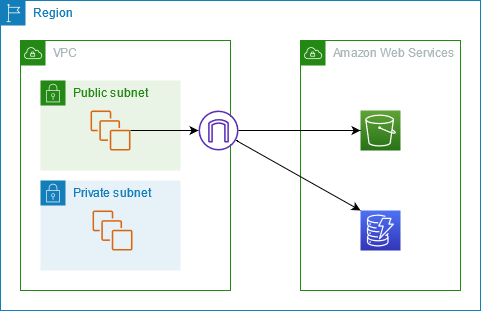
For services like CloudWatch Logs or API Gateway, you would use Interface Endpoints. These involve creating an ENI in your subnet, providing a private IP address for the service. Your applications would then use the private DNS name provided by AWS to access the service.

AWS PrivateLink: Extending Private Connectivity Beyond AWS Services
AWS PrivateLink takes the concept of private connectivity a step further. It enables you to privately connect your VPCs to supported AWS services, services hosted by other AWS accounts (Service Consumer and Service Provider), and supported AWS Marketplace partner services.
Key Benefits of AWS PrivateLink:
- Simplified Network Management: You don’t need to manage public IP addresses, firewall rules, internet gateways, NAT devices, VPN connections, or Direct Connect connections to establish secure connectivity.
- Enhanced Security: Network traffic remains entirely within the AWS network and does not traverse the public internet, reducing the attack surface.
- Connectivity Across Accounts: Securely share services across different AWS accounts without exposing them to the public internet.
Analogy: Think of AWS PrivateLink as building a dedicated, secure, and private road that directly connects your office building not only to other departments on your campus (AWS services) but also to the secure office buildings of your partners and suppliers located on a different, but connected, private campus (other AWS accounts or Marketplace vendors).
Practical Use-Case: SaaS Integration via AWS Marketplace
Many SaaS providers on the AWS Marketplace offer their services via AWS PrivateLink. As a consumer, you can create an endpoint in your VPC that privately connects to the provider’s service.
Step-by-Step (Conceptual):
- Subscribe to a PrivateLink-enabled SaaS offering on AWS Marketplace.
- The provider will share a Service Name with you.
- In your VPC console, create an Interface Endpoint.
- Choose “Find service by name” and enter the Service Name provided by the vendor.
- Select your VPC and subnets where you want the endpoint ENIs to be created.
- Associate appropriate security groups with the endpoint ENIs to control inbound traffic.
Once the endpoint is created, your applications within your VPC can securely access the SaaS provider’s service using the private IP addresses of the endpoint ENIs.
Practical Use-Case: Building a Shared Services VPC
Imagine you have multiple AWS accounts for different teams or environments. You might want to centralize certain services, like logging or security tools, in a shared services VPC. With PrivateLink, you can enable other VPCs in your organization to privately connect to these services without exposing them to the public internet.
Key Takeaways
- VPC Endpoints (Interface & Gateway) provide private connectivity from your VPC to supported AWS services, keeping your traffic within the AWS network.
- Interface Endpoints (PrivateLink powered) are more versatile and support a wider range of services by creating ENIs in your subnets.
- Gateway Endpoints are specific to S3 and DynamoDB and work by adding routes to your route tables.
- AWS PrivateLink extends private connectivity to services in other AWS accounts and supported AWS Marketplace partner services.
- Both VPC Endpoints and PrivateLink enhance security by eliminating the need for public IP addresses and preventing traffic from traversing the public internet.
- They simplify network management by reducing the need for complex routing rules and network appliances.
By leveraging VPC Endpoints and AWS PrivateLink, you can build a more secure and robust AWS infrastructure, ensuring that your sensitive data and inter-service communication remain private and protected.